HubSpot Service Hub for B2B Companies: Pricing and Costs

The subscription tier is only part of the cost of HubSpot Service Hub for B2B companies. HubSpot offers Free, Starter, Professional, and Enterprise options, while the total investment can also depend on seats, connected hubs, and implementation needs. That makes the right fit a question of both pricing and how your teams need to work.
It’s reasonable to look beyond the monthly subscription: service operations rely on customer data, processes, and handoffs across teams, and those requirements shape the platform you need. A lower tier may suit a focused support function, while more complex B2B operations may call for broader capabilities and configuration.
This article explains how HubSpot’s tiers and seat-based pricing affect costs, what implementation and connected hubs add to the decision, and which operational needs matter most. You’ll come away with a clearer framework for assessing whether Service Hub fits your B2B company and what to account for before committing.
Key Takeaways
- Build a realistic budget by looking beyond the subscription tier to seat needs, connected hubs, and implementation requirements.
- Map how marketing, sales, and service teams share customer information to determine which hubs support your B2B workflows.
- Compare the platform’s capabilities with your sales-cycle complexity and team needs before choosing a tier or broader setup.
- Assess how Service Hub’s support and customer-success features could strengthen ongoing client relationships and service operations.
HubSpot pricing and implementation costs
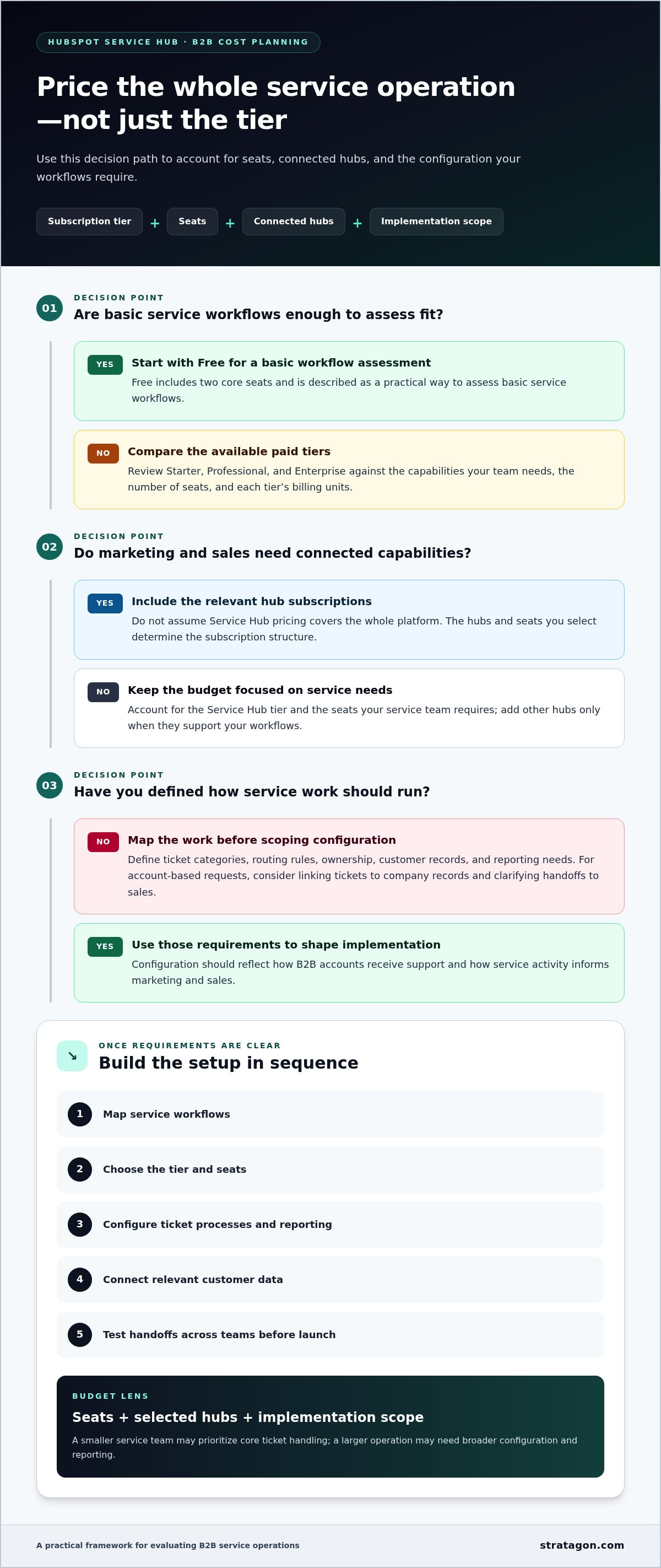
For hubspot service hub for b2b companies, subscription price is only one part of the decision. Seat counts, selected hubs, and the configuration needed for tickets and customer workflows all shape the platform’s total cost. Compare those requirements against current processes before selecting a tier, so marketing and sales data connect with service operations effectively.
HubSpot Service Hub has Free, Starter, Professional, and Enterprise tiers. Free includes two core seats, making it a practical way to assess basic service workflows. These tiers use different billing units, so compare seat requirements as well as features and pricing.
A B2B team considering connected marketing and sales capabilities should account for the relevant hub subscriptions, not assume Service Hub pricing covers the entire platform. The mix of hubs and seats determines the subscription structure.
Implementation involves more than choosing a plan. Teams need to define ticket categories, routing rules, ownership, customer records, and reporting needs. For example, a support team handling account-based requests may need to link tickets to company records and establish clear handoffs to sales. Analytics are more useful when teams agree on definitions and data sources before building dashboards. Configuration choices affect how consistently the platform supports everyday work.
Set up Service Hub by mapping service workflows, choosing the tier and seats, then configuring ticket processes and reporting. Next, connect relevant customer data and test handoffs across teams before launch. Each step should reflect how B2B accounts receive support and how service activity informs marketing and sales.
Build the budget around the seats you need, the hubs you select, and the implementation scope. A smaller service team may prioritize core ticket handling, while a larger operation may need broader configuration and reporting. Comparing operational needs with tier pricing gives decision-makers a clearer picture of recurring subscription costs and the work required to make the platform useful.
How HubSpot’s hubs support B2B operations
HubSpot’s six hubs share a database, connecting customer activity across marketing, sales, and service. For B2B teams, that shared context can link support conversations with account history and retention priorities.
Service and Success Features
Service Hub brings customer service and success activity together with customer records. This gives support teams account context before they respond and helps sales teams see ongoing service issues. HubSpot Service Hub includes over a dozen AI-powered tools and a GPT-powered chatbot described as providing support around the clock. These capabilities can help teams respond to common questions and organize service interactions.
Connections extend beyond HubSpot: the platform offers more than 2,000 integrations, while Service Hub integrates with nearly 200 third-party tools. A B2B company can connect relevant systems so customer information supports a more consistent conversation. For example, linking service activity with account records can help a dedicated account team understand open tickets before a renewal discussion.
SLAs, Ticket Routing, and Escalations
SLAs define service targets, ticket routing assigns work, and escalations move unresolved issues to the right owner. Together, these processes give B2B teams a practical way to manage response expectations and protect important account relationships.
Service Hub supports SLAs, routing, and escalations through configured service processes. Teams set response targets, assign ticket ownership, and establish escalation rules for unresolved or priority issues. For example, a ticket tied to a strategic account can go to a dedicated team, with a clear next step if it remains open.
Routing works best when ticket categories reflect real customer needs. Teams can distinguish technical questions from billing issues, then assign each category to the right owner. Escalation rules clarify who takes over and what information should accompany the handoff. This structure preserves context instead of forcing customers to repeat themselves after each transfer.
Before launch, map ownership, service targets, and escalation paths to existing account workflows. Teams aligning these processes can include CRM workflow design in a broader service-platform approach.
When HubSpot may not be the right fit
HubSpot’s fit depends on revenue, team size, service complexity, and the workflows each team needs. Compare those requirements with the platform’s scope before committing to implementation.
Comparing Service Hub Alternatives
HubSpot Service Hub, Zendesk, Salesforce Service Cloud, and Intercom should be compared against your support model, CRM context, and automation needs. HubSpot’s six hubs share a database, which can connect service records with marketing and sales activity. For a B2B company, the practical distinction is how each platform supports account context, outreach, ticket workflows, and reporting.
Assess each option against the same scenarios: a new customer onboarding request, an unresolved technical issue, and a renewal conversation. Compare how teams capture context, assign ownership, and connect support activity to revenue workflows. This makes the comparison relevant to operating needs, rather than relying on product names alone.
Assessing Service Hub Suitability
Service Hub may be excessive for a company below $1 million in revenue with one or two salespeople, especially if basic support needs don’t justify a broader platform. A simpler setup can make sense when the team has few handoffs and limited automation requirements.
Company size alone doesn’t settle the question. A $20 million B2B company with a marketing team of three may still need connected customer data and coordinated service workflows. Its fit depends on whether those processes justify the platform’s implementation and ongoing administration.
Configuration matters, too. HubSpot’s default settings fit a 30-day SMB sales cycle, while B2B cycles may require different workflows. Teams managing longer buying processes should map account context, stakeholder changes, and handoffs before onboarding. If current systems already support those needs cleanly, switching may add complexity without improving operations.
Before deciding, document which service cases need automation, who is responsible for each handoff, and what reporting leaders need. A focused comparison can reveal whether the issue is a genuine platform gap or a workflow design problem. If existing HubSpot tools are underused, optimization may address the issue more effectively than replacing the system.
What are the HubSpot Service Hub features for B2B customer service and success?
HubSpot Service Hub combines customer service tools with customer and account context. For B2B teams, that context helps service staff understand prior interactions and gives customer success teams a clearer view of ongoing needs. The value comes from connecting service activity to the wider relationship, not treating each ticket as an isolated request.
Ticket records help teams organize customer questions and preserve the details behind each issue. For example, when a customer reports a recurring product problem, the team can review the service history to guide the next conversation. Clear records also help colleagues maintain continuity when ownership changes, particularly across support, account management, and sales.
Service Hub includes over a dozen AI-powered tools. These can support teams as they manage recurring service work, while employees remain responsible for applying account knowledge and judgment. HubSpot also describes its GPT-powered chatbot as providing support around the clock. That can give customers another way to seek answers, while complex B2B requests still need thoughtful human attention.
Customer success means recognizing patterns, not just closing individual tickets. Teams can review service interactions alongside account needs to identify recurring friction that may affect adoption or retention. Repeated onboarding questions, for instance, could signal a need for clearer guidance or coordinated follow-up from the account team.
HubSpot dashboards can centralize reporting and provide a combined view of business, marketing, and sales processes. Service leaders can use reports to examine ticket trends and discuss operational priorities with other teams. Agreeing on what each measure means helps prevent departments from drawing conflicting conclusions from the same customer activity.
For a stronger setup, connect customer records, ticket practices, and reporting goals to the way your B2B teams work. Plan a HubSpot CRM implementation around those service and customer-success requirements.
HubSpot Service Hub’s GPT-powered chatbot is described as providing 24/7 support, complementing the customer service team’s other support options and offering customers another way to seek help outside direct conversations with staff.
Stratagon: HubSpot CRM Implementation
Stratagon helps B2B teams align HubSpot configuration with their customer processes through HubSpot CRM Implementation. Turn to this work when disconnected records, unclear handoffs, or service workflows make it difficult to use customer data consistently across teams.
Implementation connects operational requirements with platform setup, including how teams organize account information and manage service activity. When customer service needs to support broader commercial priorities, digital transformation can frame the changes, while Sales Enablement can help align sales processes with customer relationships. For teams pursuing a focused-account strategy, Account-Based Marketing (ABM) can connect target-account priorities with relevant workflows.
Discuss your HubSpot goals and business needs with Stratagon, or visit stratagon.com.
Make Your Service Platform Work as One System
The next step is to define what better service should enable across your organization. A shared operating model can clarify how customer teams use information, coordinate decisions, and keep the customer experience consistent as needs evolve. That purpose should guide how you develop hubspot service hub for b2b companies, rather than allowing software settings to dictate the process.
Stratagon supports this work through HubSpot CRM Implementation and digital transformation, aligning platform decisions with business priorities. For organizations coordinating high-value accounts, Account-Based Marketing (ABM) can connect account strategy with relevant customer engagement. The focus is on making technology work for the people and processes behind customer relationships.
Bring your goals and operational priorities into the conversation, then identify a practical path forward. Contact Stratagon to discuss your HubSpot needs and take the next step toward a more connected customer operation.
Frequently Asked Questions
What do B2B customers say about HubSpot Service Hub, and what results can companies expect?
Reported customer results include Youth on Course’s 59% year-over-year increase in members and 7% increase in customer satisfaction, and Unipart’s pipeline growth from millions to billions over 12 months with a 5-point increase in net promoter score. These are examples, not guaranteed results.
Which HubSpot Service Hub plan is best for a small or mid-sized B2B company?
For a small B2B team with focused support needs, the Free tier includes two core seats, while growing teams typically benefit from the Starter or Professional plans to unlock advanced automation and reporting features.