HubSpot Reporting Add-ons: Set Goals and Share Reports

A report that shows only the overall total can hide where performance is changing. Learning how to use HubSpot reporting add-ons means organizing reports around meaningful segments and dimensions, connecting results to goals, and sharing updates by email so teams can work from the same view of performance.
Reporting should clarify decisions, not simply add dashboards. This guide explains how segmentation and multi-dimensional analysis can reveal patterns, how goals help teams track progress, and how scheduled email sharing keeps stakeholders informed. It also covers where careful alignment is needed so reporting supports a consistent view across marketing and sales.
Key Takeaways
- Segment reports around meaningful business dimensions to see how performance varies across teams, stages, and time periods.
- Match the report type to the question, using HubSpot’s available objects and visualizations to bring related data into view.
- Plan reporting access, goals, and email distribution together so stakeholders receive useful insights in a format they can act on.
- Professional HubSpot CRM implementation can align reporting setup with your data and business processes, especially when teams need a consistent view of performance.
How can a professional segment reports and analyze multiple dimensions using HubSpot reporting add-ons?
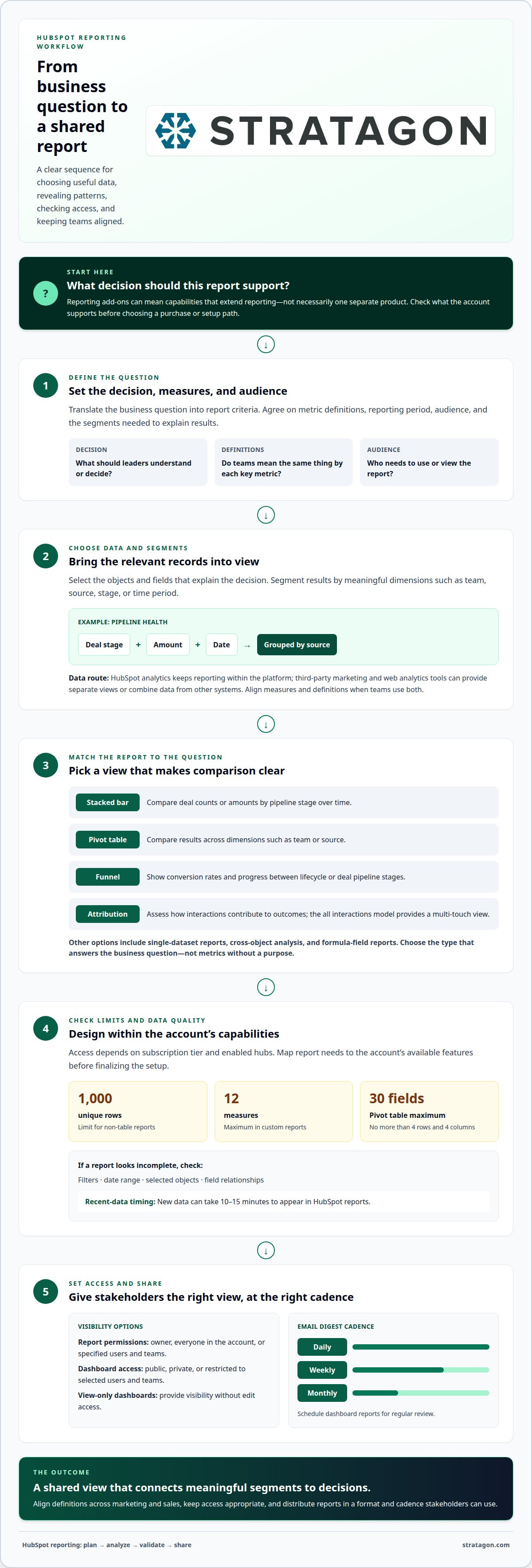
Start with the decision a report needs to support, then choose the data and segments that explain it. For example, a stacked bar chart can show deal counts or amounts by pipeline stage over time. A pivot table can compare results across dimensions such as team or source, helping marketing and sales identify where funnel movement changes.
HubSpot’s built-in analytics keep reporting within the platform, while third-party marketing and web analytics tools can offer separate views or combine data from other systems. The right approach depends on whether teams need a shared CRM view, broader channel analysis, or both. Advanced marketing analytics works best when the measures and definitions align across those views.
To create a dashboard, translate business questions into report criteria, choose the relevant objects and fields, then select charts that make comparisons easy to understand. Define the decisions the dashboard should inform, metric definitions, reporting period, audience, and required segments. For example, a team tracking pipeline health might need deal stage, amount, and date grouped by source.
In the United States, cost depends on the subscription, required features, and implementation scope. Those factors shape the estimate provided after a quote request.
Reporting access and features depend on the HubSpot subscription tier and enabled hubs. Map the required report types to the account’s available capabilities before designing the reporting setup.
Limits include 1,000 unique rows for non-table reports. Custom reports support up to 12 measures; pivot tables allow up to 30 fields, with no more than four rows and four columns. These constraints shape how a professional groups data and chooses visualizations.
For privacy and security, configure report access for the owner, everyone in the account, or specific users and teams. Review field selection and connected data sources, too, so dashboards show relevant information without unnecessarily broadening access.
When a report looks incomplete, a professional checks its filters, date range, selected objects, and field relationships. New data can take 10-15 minutes to appear in HubSpot reports, so timing matters when diagnosing a recent-data discrepancy.
What are HubSpot reporting add-ons and what features do they include?
“Reporting add-ons” can refer to capabilities that extend how teams build, interpret, and share HubSpot reports. It does not necessarily mean one separate product. HubSpot’s custom report builder supports analysis across contacts, companies, deals, tickets, and custom objects, including relationships between objects. This makes it possible to connect activity with outcomes, such as examining how marketing interactions relate to deals.
Choose report options to fit the question and dataset. A single-dataset report can focus on contacts, companies, deals, tickets, custom objects, activities, line items, or feedback submissions. Cross-object analysis brings related records together, while formula-field reports support calculations from report data. Match the report type to the business question rather than adding metrics without a clear purpose.
HubSpot also offers specialized reporting approaches. Funnel reports show conversion rates and progress between lifecycle or deal pipeline stages. Attribution reports help assess how interactions contribute to outcomes. For a multi-touch view, use the all interactions attribution model, then run and save the report. These features help teams distinguish stage progression from the influence of multiple touchpoints.
- Recurring email digests: Schedule dashboard reports as daily, weekly, or monthly emails for regular review.
- Controlled visibility: Set dashboards or reports to public or private, or restrict them to selected users and teams.
- View-only dashboards: Give stakeholders visibility without granting edit access.
- Report permissions: Share a report with its owner, everyone in the account, or specified users and teams.
These options connect analysis with decisions: a sales leader might review pipeline movement, while marketing examines attribution patterns. The right setup depends on the questions each team needs answered and how often stakeholders need the information.
How can a professional help you purchase or activate HubSpot reporting add-ons?
First, clarify what “add-on” means for your reporting needs. HubSpot includes reporting capabilities, but access depends on the account’s subscription and required features. Map the desired outcome, such as comparing campaign influence with deal progress, to the relevant capability before recommending a purchase or configuration. Knowing how to use HubSpot reporting add-ons also means distinguishing a subscription requirement from a setup challenge.
Begin by reviewing your HubSpot portal, current subscription, user permissions, and reporting goals. Share the questions leaders need answered, the teams who will use each dashboard, and the business definitions behind key metrics. For example, clarify whether “qualified” means a particular lifecycle stage or a status defined by sales. Consistent definitions help marketing and sales interpret the same chart in the same way.
Next, identify what the account already supports and what requires a subscription change or additional setup. This distinction matters because a new purchase may not solve a data-model or permissions issue. Document required features, affected users, data sources, and expected report outputs, then align the purchasing decision with the reporting use case. For teams deciding how to use HubSpot reporting add-ons, this assessment connects access choices to operational needs.
- Confirm the use case: Define the decision the report must inform, such as campaign contribution or pipeline review.
- Map requirements: Connect each question to HubSpot objects, report types, and access needs.
- Review account fit: Compare those requirements with the portal’s current subscription and configuration.
- Plan activation: Coordinate access, report setup, and stakeholder review after the required capability is available.
After activation, test representative records and check that filters, permissions, and report outputs match agreed definitions. For example, a campaign report should capture the intended interactions and audience before it becomes a recurring leadership view. This evaluation helps distinguish a product-access need from implementation work, giving the purchase decision a clear operational purpose.
How does a professional connect a reporting add-on to your HubSpot account?
Connecting a reporting capability starts with the HubSpot account structure, not a generic installation checklist. Identify the intended data source, report outcome, and required account access. For example, a dashboard combining campaign activity and deal outcomes needs the relevant records and relationships in the portal. This initial mapping helps ensure the connection can answer the business question.
Next, review the connection method and authorization requirements for the selected capability. Coordinate access with the appropriate account administrator, then configure the connection using the supported workflow. Match permissions to responsibilities: someone configuring a connection needs appropriate access, while stakeholders who only review results can have view-only visibility. This keeps implementation responsibilities separate from report consumption.
Next, map the data. Align fields from the connected source with the HubSpot objects and properties used in reports. For instance, a campaign identifier must correspond to the right marketing activity before a report can relate that activity to a deal. Review naming conventions, date fields, and record relationships as well, so filters and groupings reflect how the organization measures performance.
Before release, test representative records from the source through to the report. Compare expected values, confirm that filters return the intended records, and investigate missing or duplicated entries. If the connection relies on recurring updates, assess whether refreshed data supports the reporting cadence stakeholders need. This validation helps distinguish a connection issue from a report configuration or source-data issue.
Finally, the professional documents the connection’s purpose, data mapping, access, and maintenance ownership. That record helps teams understand which source feeds a chart and who manages changes when fields or processes evolve. For a reporting setup aligned with your CRM structure, plan a connected HubSpot reporting implementation.
Stratagon: HubSpot CRM Implementation
Stratagon helps organizations align HubSpot CRM setup with reporting needs, business processes, and team responsibilities. Turn to its HubSpot CRM Implementation service when reports depend on inconsistent data, disconnected workflows, or unclear ownership across marketing and sales.
The work connects reporting requirements to CRM structure: which records teams need, how key fields should be defined, and who needs dashboard access. This foundation helps leaders interpret performance consistently and gives teams a clearer view of the measures guiding decisions. When growth strategy also calls for coordinated target-account activity, Account-Based Marketing (ABM) can complement that operational alignment.
Stratagon also supports digital transformation and Sales Enablement, helping connect systems and processes with the way teams work. If your reporting setup needs to reflect a broader operational change, discuss your goals, current CRM structure, and stakeholder needs with Stratagon.
Turn reporting into a stronger operating rhythm
Make reporting part of how teams set priorities, review progress, and adjust their work. A deliberate approach to how to use HubSpot reporting add-ons starts with the decisions your organization needs to make, then aligns data and reporting processes around them. This gives marketing, sales, and leadership a shared basis for action rather than disconnected views of performance.
As goals and workflows evolve, revisit whether reports still answer the questions teams need to resolve. Changes to campaign strategy, sales processes, or CRM data can affect how stakeholders interpret results. A thoughtful reporting foundation makes those changes visible and supports better coordination across the organization.
Stratagon can help align HubSpot reporting with your CRM and broader business processes. Contact Stratagon to improve reporting and explore a practical next step for your team.
Work with Stratagon to build a reporting approach that gives your teams clearer information and confidence to act.